- Page d'accueil /
- Jeux vidéo /
- PC /
- Accessoires /
- Controllers /
- Joysticks /
- Zero Delay Arcade USB Encoder PC to Joystick ...
0 ratings




Numéro d'article:
84786211
Zero Delay Arcade USB Encoder PC to Joystick and Button for MAME Fight Stick Control Circuit Board DIY Arcade Game Kit Parts
Numéro d'article:
84786211
€ 17
Price Details
Excluding Shipping & Custom charges ( Shipping and custom charges will be calculated on checkout )
*All items will import from États-Unis
0 ratings
Écrire un commentaire
En stock
 Importé depuis la boutique USA
Commandez maintenant et recevez votre commande aux alentours du Sunday, Août 23
Transaction sécurisée
Ubuy s'engage à protéger votre sécurité et votre confidentialité. Notre système avancé de sécurité des paiements garantit la confidentialité en chiffrant vos informations lors de la transmission grâce aux protocoles AES (Advanced Encryption Standards) et SSL (Secure Socket Layer). Vos coordonnées de paiement sont 100 % sécurisées car nous ne partageons pas vos informations de paiement avec des vendeurs tiers.
Nos meilleurs partenaires logistiques


High-performance COMS technology with TURBO support function keys and AUTO mode accompanied by LED flashing.

Livraison
rapide

Retour
gratuit*

Emballage sécurisé

Produits 100 % originaux

Conformité PCI DSS

Certifié ISO 27001


Note: Step Down Voltage Transformer required for using electronics products of États-Unis store (110-120). Recommended power converters Acheter maintenant.


Ce qui se démarque
Zero Delay Functionality
Eliminate lag with this encoder, ensuring seamless gameplay for arcade enthusiasts and competitive gamers. Experience immediate input response, enhancing performance while playing MAME and other classic arcade games.
Easy DIY Setup
Designed for DIY enthusiasts, this kit allows straightforward assembly for building custom fight sticks. The user-friendly interface simplifies installation, making it perfect for both beginners and experienced builders.
Versatile Compatibility
Compatible with various joystick and button setups, this encoder supports a wide range of arcade games and consoles. Enjoy flexibility in your gaming experience, adapting to your favorite retro titles effortlessly.
Détails du produit
- Zero Delay Arcade USB Encoder PC to Joystick and Button For MAME Fight Stick Control Circuit Board DIY Arcade Game Kit Parts
| Compatible Devices | Windows |
| Controller Type | Joystick |
| Connectivity Technology | USB |
| Button Quantity | 8 |
| Hardware Platform | Desktop, pc |
| Package Quantity | 1 |
| Brand Name | Midzoo |
| Manufacturer | Midzoo |
| Manufacturer Part Number | MiMODULE-13223 |
| Brand | Midzoo |
| Number of Buttons | 8 |
| Item Weight | 0.5 lbs (230 grams) |
À qui est-ce destiné ?

-
DIY Enthusiasts
Perfect for hobbyists looking to build their own arcade controls for a personalized gaming experience.
-
MAME Users
Ideal for players using MAME emulator wanting to create authentic arcade setups with responsive controls.
-
Budget Gamers
Cost-effective solution for gamers who want quality controls without spending on pre-made arcade sticks.

-
Casual Gamers
Not suitable for those who prefer plug-and-play solutions without the need for assembly or customization.
-
Professional Players
May not meet the rigorous demands for competitive gameplay where top-tier performance is essential.
-
Tech-Newbies
Can be challenging for users unfamiliar with electronics or DIY setups required for arcade modifications.
DESCRIPTION DU PRODUIT
Vous avez une question ? Chattez avec nous
Questions et réponses des clients
-
question:
What is a Zero Delay Arcade USB Encoder?
répondre: A Zero Delay Arcade USB Encoder is a versatile controller interface that allows you to connect arcade joystick and buttons to your PC. It converts the signals from the joystick and buttons into a USB format that your computer recognizes, making it perfect for DIY arcade projects or fight sticks for MAME games. This encoder is designed to minimize input lag, giving gamers a responsive experience, which is crucial during high-speed gameplay scenarios. -
question:
How do I connect the Zero Delay Arcade USB Encoder to my joystick and buttons?
répondre: Connecting the Zero Delay Arcade USB Encoder is straightforward. Simply wire your arcade joystick and buttons to the encoder's designated terminals, following the provided schematic. Each button and the joystick have specific points that correspond to the encoder. This setup allows for easy customization of button layouts, enabling you to create a personalized gaming experience tailored to your preferences. -
question:
Is the Zero Delay Arcade USB Encoder compatible with all PC games?
répondre: While the Zero Delay Arcade USB Encoder is optimized for arcade games and MAME applications, it is generally compatible with most PC games that support game controllers. The encoder acts as a generic gamepad, allowing you to play a wide range of games with your custom joystick setup. It's ideal for both retro classics and modern games, making it a versatile addition to any gaming rig. -
question:
Can I use this encoder for console gaming?
répondre: The Zero Delay Arcade USB Encoder is typically designed for PC use and may not be compatible with gaming consoles. Console systems require different connection standards. However, with the right adapters, some users have had success using encoders on certain consoles. It's important to verify compatibility with your specific console and to check for the necessary cables or adapters before attempting to use it. -
question:
What’s the benefit of using a Zero Delay Arcade USB Encoder for a DIY arcade project?
répondre: Using a Zero Delay Arcade USB Encoder in a DIY arcade project significantly enhances the gaming experience by reducing latency. Its zero delay feature ensures that your button presses translate instantly into on-screen actions. This is especially important for competitive gaming, where every millisecond counts. A DIY arcade stick provides a unique custom build, allowing you to select your preferred joystick and button styles for ultimate comfort and playability. -
question:
What tools do I need to install the Zero Delay Arcade USB Encoder?
répondre: To install the Zero Delay Arcade USB Encoder, you'll need basic tools such as a screwdriver for assembling your arcade stick and wire strippers or connectors for attaching the joystick and buttons. It's also helpful to have soldering tools if you're choosing to solder the connections for a more permanent setup. Most importantly, a good understanding of basic electronics and wiring principles will assist you in executing a successful installation. -
question:
Can multiple encoders be used together for a multiplayer setup?
répondre: Yes, multiple Zero Delay Arcade USB Encoders can be utilized simultaneously for a multiplayer setup. Each encoder connects via USB to your computer, allowing multiple players to participate in the game without input interference. This makes it perfect for arcade gaming sessions with friends, where each player can have their own dedicated controls, enhancing the social gaming experience. -
question:
How can I troubleshoot connection issues with the Zero Delay Arcade USB Encoder?
répondre: If you're facing connection issues with the Zero Delay Arcade USB Encoder, first ensure all wiring connections are secure and correctly oriented. Check your PC's device manager to see if the encoder is recognized; if not, try different USB ports. Additionally, ensure your drivers are up to date and that the configuration settings in your emulator or game are properly set to recognize the joystick inputs. Reassessing these factors often resolves most common issues. -
question:
Is there a limit to how many buttons I can connect to the encoder?
répondre: You can typically connect up to 12 buttons and a joystick to a single Zero Delay Arcade USB Encoder. The encoder has inputs for various controls, allowing for a standard two-player setup. If you require more buttons, consider utilizing multiple encoders or exploring encoders specifically designed to accommodate additional inputs for complex setups. This ensures you have full control while playing diverse arcade titles. -
question:
Where can I buy the Zero Delay Arcade USB Encoder in French Guiana?
répondre: You can purchase the Zero Delay Arcade USB Encoder from Ubuy in French Guiana. Ubuy provides a convenient online shopping experience with a wide selection of gaming accessories tailored for DIY arcade enthusiasts. By shopping on Ubuy, you can easily find the encoder along with other necessary components to build your perfect fight stick or arcade setup.
Midzoo Joysticks Editorial Review
Aucune critique éditoriale trouvée
Avis et évaluations clients
1 évaluations des clients
-
5 étoile
100%
-
4 étoile
0%
-
3 étoile
0%
-
2 étoile
0%
-
1 étoile
0%
Donnez votre avis sur ce produit
Partagez votre avis avec d'autres clients
Platform Trust & Buyer Confidence

MT
Mohd
Verified buyer
“The product received very good packaging & safe…Thank You”
16 June 2026 · via Trustpilot
SJ
Shawati
Verified buyer
“Accurate delivery timing given”
16 June 2026 · via Trustpilot
YB
Youcef
Verified buyer
“Not madly expensive like I thought, and much quicker than promised.”
15 June 2026 · via Trustpilot
LM
Leila
Verified buyer
“Never dealt with Ubuy before, but everything worked out great. Seamless cross border purchasing and shipping. Thanks!”
6/7/2026 · via Trustpilot
KA
Kwame
Verified buyer
“The process was smooth, with clear communication and timelines. This was my 1st purchase and I am really impressed. I will definitely be coming back.”
12 June 2026 · via Trustpilot
Paiement sécurisé
Global Delivery
Easy Returns
Genuine Products
Related Categories
Historique des prix du produit
Informations importantes
- Limitations : Pour les produits expédiés à l'international, veuillez noter que toute garantie du fabricant peut ne pas être valide ; les options de service du fabricant peuvent ne pas être disponibles ; les manuels, instructions et avertissements de sécurité des produits peuvent ne pas être dans les langues du pays de destination ; les produits (et les matériaux qui les accompagnent) peuvent ne pas être conçus conformément aux normes, spécifications et exigences d'étiquetage du pays de destination ; et les produits peuvent ne pas être conformes à la tension et aux autres normes électriques du pays de destination (nécessitant l'utilisation d'un adaptateur ou d'un convertisseur le cas échéant). Il incombe au destinataire de s'assurer que le produit peut être importé légalement dans le pays de destination. En cas de commande auprès d'Ubuy ou de ses filiales, le destinataire est l'importateur officiel et doit se conformer à toutes les lois et réglementations du pays de destination.
- Tous les produits listés sur Ubuy ne sont pas à vendre, Ubuy étant un moteur de recherche mondial. Les produits sont soumis aux réglementations en matière d'exportation et de commerce.
€ 17
Commandez maintenant et recevez votre commande aux alentours du Sunday, Août 23
This item is not restrict in my country.(Please click on above link if this item is not restrict in your country, So our team will review and allow.)
QTY:
Transaction sécurisée
PCI DSS compliant and ISO 27001:2022 certified, with encrypted payments and full buyer protection on every order.
Nos meilleurs partenaires logistiques
Livraison transfrontalière la plus rapide
Caractéristiques et avantages
- Brand new and high-quality electrical components
- Supports multiple forms of gaming devices
- Compatible with USB1.0/USB2.0 and various Windows platforms
- Features AUTO-FIRE and TURBO modes with LED flashing
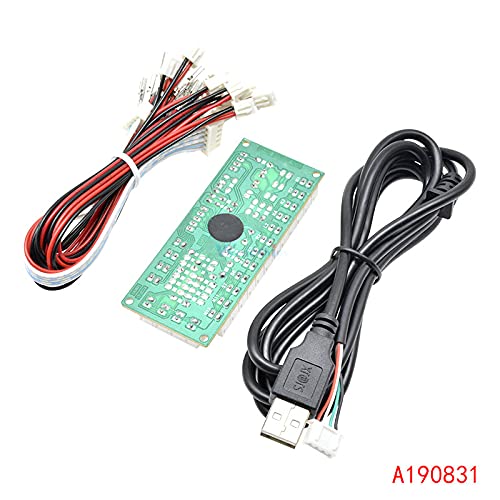
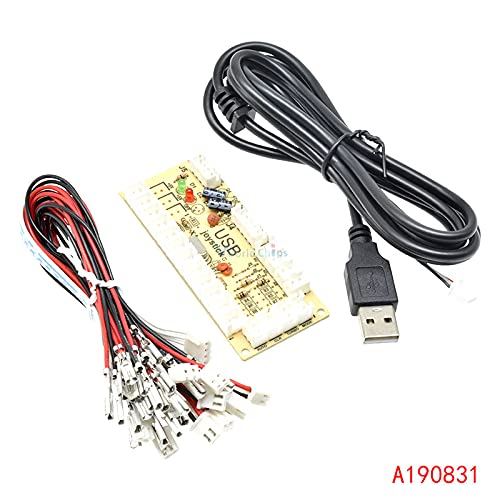
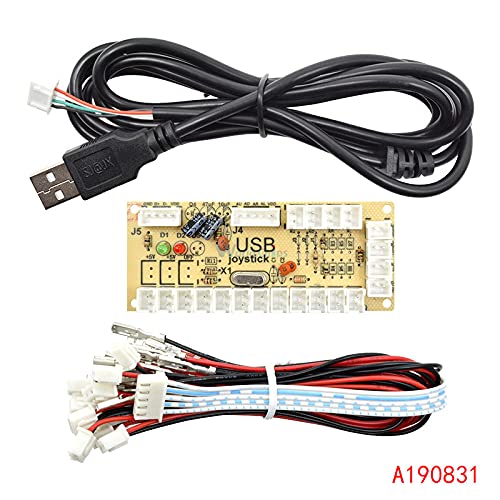
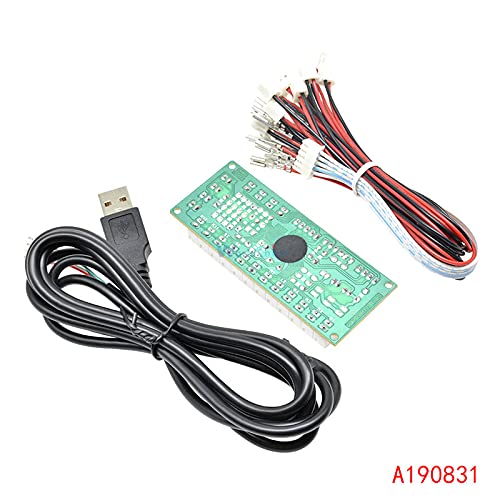
- Includes encoder board, USB cable, button plug cables, and rocker plug cables
- Perfect for DIY arcade game kit parts
Ubuy Assurance
Experience worry-free shopping with 100% original products, PCI DSS-compliant payment security, ISO 27001-certified data protection, the fastest cross-border delivery, free returns *, and secure packaging on every order.